
Talk to a Geek
Product

WebTerm

Move beyond legacy desktop emulators and per-PC licenses. WebTerm gives every user tabbed MultiValue sessions in a browser, on any device, with nothing to install.

Emulation
Wyse, ADDS ViewPoint, VT100/220
Connects by
Telnet or SSH
Runs on
Windows, Mac, Linux and tablets
Works with
MVsharp, D3, UniVerse, UniData, jBASE
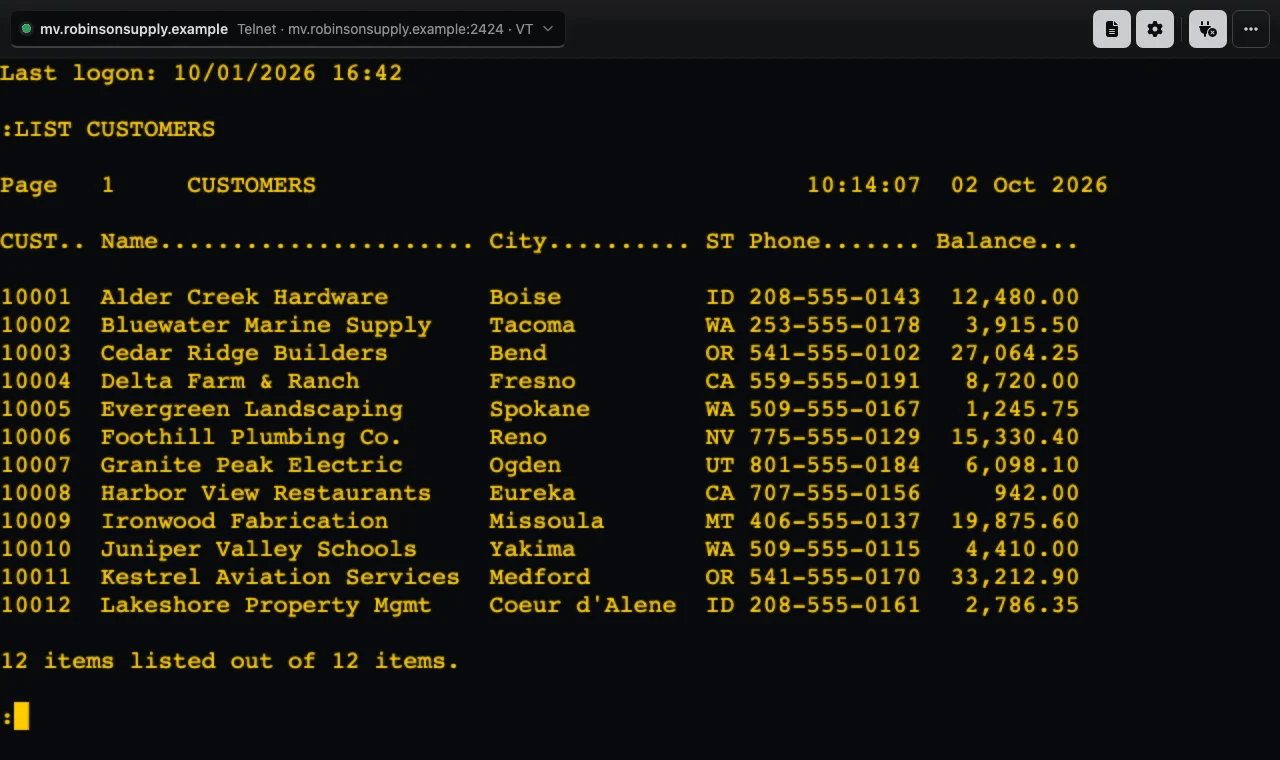
WebTerm in a browser: a MultiValue LIST CUSTOMERS report over Telnet, with the session toolbar above
The challenge

Desktop emulators cost more than they should

Traditional terminal emulators are installed, updated and licensed PC by PC. Every new hire, laptop or remote worker means another install and another seat to track, and nobody can see what a user sees when they call for help.

How it works

How WebTerm works

  1. 01

    Connect

    Open WebTerm in any modern browser, pick a saved session profile and connect to your MultiValue host over Telnet or SSH.

  2. 02

    Work

    Run your applications in tabs with Wyse, ADDS ViewPoint or VT100/220 emulation, and open MultiValue BASIC code in a real editor.

  3. 03

    Support

    Admins see every active session on the Dashboard and can watch or step in to help, without screen sharing.

What it does

Key features

Zero install

Runs in any modern browser on Windows, Mac, Linux or a tablet. No thick clients to install or update, and no per-PC licenses to track.

Multi-emulation

Switch between Wyse, ADDS ViewPoint and VT100/220 modes to match the applications you already run, with 132-column mode and configurable function keys.

Built-in code editor

WCE opens MultiValue BASIC and proc source in a full browser code editor based on the technology behind Microsoft's VS Code, with syntax highlighting and completion, so your developers can edit and compile without a line editor at TCL.

Excel and CSV, in and out

WTD downloads MultiValue items to a CSV or Excel file on your PC, or uploads a CSV file or Excel workbook into your database, with familiar prompts.

Tandem viewing and control

From the Dashboard, support and training staff can watch a user's live session, and admins can take control to help, without the user sharing their screen.

Productivity

Tabbed sessions with their own connections and settings, adjustable font sizes, copy and paste, and capture of a session to a file or the clipboard.

Session profiles and resume

Save connection profiles, share them or turn them into desktop shortcuts, and pick up where you left off if a connection drops.

Central administration

Install once on a server your users' browsers can reach, update once for everyone and manage users, roles and settings from the web Dashboard.

Built to grow

A plug-in design means new emulations and features can be added quickly, and WebTerm can be embedded in an internal portal or kiosk.

Site licensing, real savings

WebTerm is licensed per site, not per seat. Add users and devices at a site without buying another license, and see the full cost up front in the table below. Compared with traditional per-seat licensing, the site-based model can reduce total cost of ownership by up to 40 percent a year.

“We built it from scratch with today’s realities in mind, including mobility, simplicity, and cost efficiency. It is fast, powerful, and built for the long haul.”

Brandon Robinson, Head Geek

Who it’s for
  • IT teams replacing desktop emulators across many PCs
  • Remote staff and branch offices that need the same green screens
  • MultiValue developers who want a real code editor
  • Support and training staff who need to see what a user sees
Talk to a Geek
How we work

Working with RDM

We work with the system you have to create the solution you need.

  1. 01

    Consultation

    Chat with one of our Geeks about your system and what you need. No sales pitch.

  2. 02

    A clear quote

    We quote the setup, installation and any customization before work starts.

  3. 03

    Installed for you

    Our Geeks install and set up the product on your system, built around your existing business logic.

  4. 04

    Grows with you

    Share new needs with our engineers to extend the feature set and business logic as your business changes.

Pricing

Simple per-site pricing

Annual licensing per site, with a one-time setup fee for each tier. No per-PC licenses.

TierSitesPer site, per yearOne-time setup
SmallUp to 3 sites$50$500
MediumSites 4 to 10$100$1,000
LargeSites 11 to 30$125$1,500
X-LargeEvery site beyond 30$150$2,500

Estimate your licensing

Estimated $350.00 per year

Annual licensing only; one-time setup fees are in the table above. For more than 50 sites, call us on 775.461.3577.

FAQ

WebTerm questions

Which MultiValue databases does WebTerm work with?

MVsharp, D3, UniVerse, UniData and jBASE.

Does anything need to be installed on user PCs?

No. WebTerm runs in a modern browser on Windows, Mac, Linux or a tablet.

How does WebTerm connect to our server?

Over Telnet or SSH, using Wyse, ADDS ViewPoint or VT100/220 emulation.

Where does WebTerm run?

On a server you choose that your users' browsers can reach. Our Geeks install and set it up, and users simply browse to it.

Can our developers edit MultiValue BASIC in WebTerm?

Yes. WCE opens MultiValue BASIC and proc source in a browser code editor with syntax highlighting and completion, and can compile and catalog from there.

Can we move data to and from Excel?

Yes. WTD downloads MultiValue items to CSV or Excel and uploads CSV files or Excel workbooks into your database.

Can support staff see what a user sees?

Yes. From the Dashboard, support and training staff can watch a live session, and admins can take control to help, without the user sharing their screen.

How is WebTerm licensed?

Per site per year, with a one-time setup fee for each tier. Small sites start at $50 per site per year plus a $500 setup.

Talk to a Geek

Ready to get more from your MultiValue system?

Tell us what you’re running and what you need. A Geek will take it from there.